App overview • August 2026

Eleph TV App: What It Does, Where It Runs and How to Check It

The Eleph TV app is an Android streaming app for live channels and on-demand video. This guide explains its interface, device boundaries, current linked APK identity and the checks to make before installation.

Conceptual illustration of a streaming app connecting an Android phone, TV box and television
Conceptual editorial illustration: the app can run on a compatible Android device while the TV acts as the display.

Eleph TV app facts at a glance

People searching for the Eleph TV app usually want to know three things first: what the app actually is, whether it works on their screen, and whether the APK they found matches the intended file. The answers are related but not interchangeable.

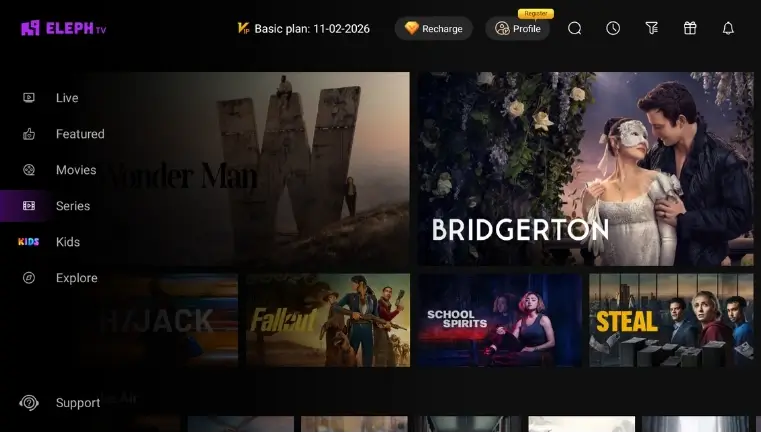
Eleph TV is presented as a streaming app with Live, Featured, Movies, Series, Kids and Explore areas. The linked project file is an Android APK, so a smart-TV brand name alone does not prove native compatibility. Verify the platform before you grant install permission.

App platform
Android APK
Linked version
1.1.3 / code 10103
Package
com.africa.elephtvplus
Checked
August 2, 2026

The file identity was checked against the project-linked direct APK. That check does not prove that the file is malware-free, licensed in every country, or supported by every streaming catalog.

What is the Eleph TV app?

Treat the app as a product and a file separately. The product describes the viewing experience; the APK is the installable package whose version, package name and source should be checked.

One app with several content areas

The interface groups live channels, featured titles, movies, series, kids content and Explore tools. Availability can vary by region, account state, server feed and update, so a copied channel list should not be treated as a permanent promise.
Different screens need different paths

Android phones and Android TV devices can install an APK directly when their settings allow it. Fire TV may need an Android-based sideloading route. LG webOS, Samsung Tizen and other non-Android systems need an external Android device or a casting workaround.

Search results are not file verification

Pages labelled mod, cracked, premium unlocked, old version or full version can point to altered files. Match the package identity and version, keep Android security protections enabled and do not confuse a search label with an official release note.

What the Eleph TV interface looks like

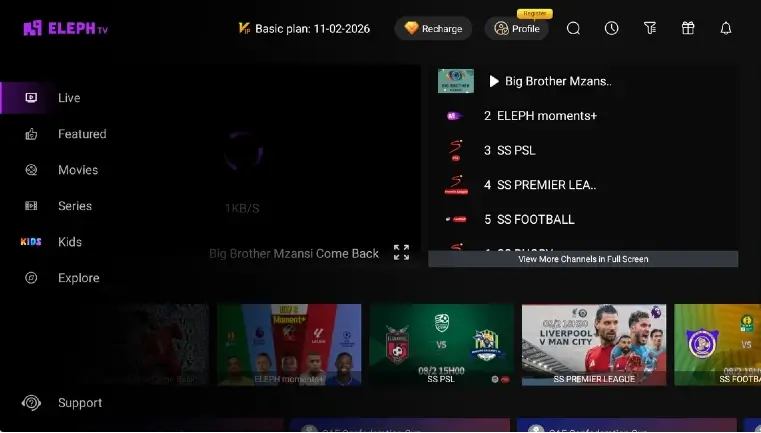
These two existing site screenshots show the kind of navigation users may see in the app. They are contextual product images, not a promise that every account or current build will display the same titles, channels or plan labels.

Eleph TV app home screen with Live, Featured, Movies, Series and Kids navigation
Existing app screenshot: home navigation and on-demand content areas.
Eleph TV app live screen with channel list and sports tiles
Existing app screenshot: live playback area and channel browsing.

Where can the Eleph TV app run?

The key question is the operating system, not only the screen brand. Use this table to choose the right guide and avoid trying to install an Android APK inside a non-Android TV system.

Device or systemAPK statusBest next step
Android phone or tabletNative Android routeUse the mobile guide and verify Install unknown apps permission.
Android TV or Google TVNative Android TV routeUse the TV guide, Downloader, browser or USB transfer.
Amazon Fire TV / FirestickAndroid-based routeCheck the exact model, then use a trusted sideloading path.
LG webOS, Samsung Tizen or VIDAANo native Android APK installUse an external Android TV device or a compatible casting method.
Windows or macOSNo native desktop APK installUse an Android emulator; the PC guide explains the boundaries.

Four checks before you install the app

A short verification routine prevents the most common APK mistakes: wrong platform, altered file, stale version or an install permission granted to the wrong app.

1

Confirm the device system

Check whether the target is Android, Android TV, Fire TV, webOS, Tizen, VIDAA, Windows or macOS. Continue only if the installation method matches that system.

2

Match the file identity

The project-linked file checked on August 2, 2026 reports version 1.1.3, version code 10103, package com.africa.elephtvplus and 44,585,157 bytes. A different package or unexpected downgrade warning is a reason to stop.

3

Grant the smallest required permission

On Android, allow installation from the specific browser or file manager you are using, then turn the permission back off if you do not need it. Do not disable Play Protect or broad device security controls.

4

Open the app and verify the result

After installation, check the app name, package identity, account prompts and visible content. If the app asks for unrelated permissions, uses a different package or shows a modified premium claim, uninstall and recheck the source.

Safety boundaries for the Eleph TV app

An app overview should help you make a better decision without turning a file check into a security guarantee or a licensing claim.

Identity is not a malware scan

Version, package name, byte size and a stable download response help identify a file. They do not prove that the APK is clean. Scan the file with tools you trust and review permissions before use.

Avoid modified APK claims

Mod, cracked and premium-unlocked builds may alter code, break updates or expose account data. Use the standard route and check VIP or subscription status inside your own account instead of trusting a label.

Check local content rules

Channel feeds and on-demand titles may have different rights in different countries. The user is responsible for following local law and the terms that apply to the content and device.

Check the current Eleph TV APK file

The page is informational, but users who decide to install still need a clear route. The project-linked direct file returned HTTP 200 on August 2, 2026, with an APK extension, application/octet-stream MIME and 44,585,157 bytes.

Read the device and safety checks above before opening an APK file.

Open the checked APK source

Verified file details: version 1.1.3 • code 10103 • com.africa.elephtvplus • 44.6 MB • server last-modified July 23, 2026

Direct file URL checkedPackage identity recordedNo malware-free guarantee

Sources and verification notes

The product site helps identify the Eleph TV brand and current product context. The direct APK link is listed separately as the project-linked file checked for response and size; it is not presented as a malware or licensing certificate.

Eleph TV product site

Brand and product context used when distinguishing the app overview from this site's download and device guides.

Visit the product site

Project-linked APK response

The direct file endpoint checked on August 2, 2026 returned HTTP 200 and a 44,585,157-byte application/octet-stream response.

Open the direct file

Eleph TV app FAQ

What is the Eleph TV app?

Eleph TV is presented as an Android streaming app with live channels, movies, series, kids content and other navigation areas. The app experience and the downloadable APK file are related but should be checked separately.

Is Eleph TV an Android app or a smart-TV app?

The linked file is an Android APK. It can be used on compatible Android phones, tablets, Android TV and some Android-based TV devices. A non-Android television system does not become compatible just because it can display HDMI video.

What is the current verified Eleph TV APK version?

The project-linked file checked on August 2, 2026 reports version 1.1.3, version code 10103, package com.africa.elephtvplus and a size of 44,585,157 bytes. This is a file identity check, not a guarantee of safety.

Can I install Eleph TV on LG webOS or Samsung Tizen?

Not as a native Android APK. Use an external Android TV or Google TV device, or a compatible casting route. See the Smart TV and LG webOS guides for platform-specific boundaries.

Is the Eleph TV app safe?

No website can turn version and package checks into a blanket malware-free claim. Review permissions, scan the file with tools you trust, keep Android security protections enabled and avoid modded or cracked packages.

Does the Eleph TV app work on a PC?

The APK is not a native Windows or macOS installer. A trusted Android emulator can provide an Android environment; the PC guide explains performance, input and source checks.

Is Eleph TV Plus the same as the Eleph TV app?

The linked package name contains com.africa.elephtvplus, but search labels are not enough to prove that two files are identical. Match the package, version and source before installing a file called Eleph TV Plus.

Should I download an Eleph TV mod APK for premium access?

No. Modified, cracked and premium-unlocked APK claims can introduce code and account risks. Install the standard package first and verify any trial, VIP or subscription status within your own account.

Topics covered

Eleph TV appAndroid APKStreaming appDevice compatibilityAPK safety