Identity is technical evidence
A package, version and hash help compare installers. They answer “which file is this?” rather than “is every stream authorized?”
Independent rights and source check
The short answer is not a simple yes or no. An APK can be technically installable while the legality of a channel, movie, live sport stream or subscription depends on licensing, location, source and how the service is used.
When people search for “is Eleph TV legal,” they may be asking three different questions: whether the app file is legitimate, whether the service has permission to show particular content, and whether using that content is allowed where they live. Those questions cannot be answered by the APK extension alone. A technically valid installer proves only that Android can read a package; it does not prove ownership, licensing or authorization for every stream.
The safest conclusion is conditional. Review the publisher and source, compare the package name with the listing you intended to use, read the service terms, and check whether the channels or live sports are licensed in your region. If a page promises every premium channel, a cracked subscription or an anonymous “free forever” login without explaining rights, consider that a warning rather than evidence.
This page is an evidence checklist, not a declaration that Eleph TV is legal or illegal everywhere. The official material we found includes a DMCA policy describing third-party or user-provided content and a separate product/download presence. That information is useful context, but it is not the same as a channel-by-channel license list. For a high-stakes decision, ask a qualified local adviser or the rights holder.
Separate the decision into two stages: identify the exact APK or account source, then check whether the content and subscription use are authorized where you watch. If either stage fails, pause before adding payment details or relying on the service.
No screenshot, working stream, trial message or download button is proof of copyright permission. Those are product or access signals only.
A useful Eleph TV legality check needs a narrower definition than “the app opens.” Streaming rights concern content and territory; software safety concerns the file and publisher; contract questions concern payment, account access and terms. Keep those categories separate.
A publisher may distribute an app without holding rights to every movie or sports feed shown inside it. A channel may be authorized in one country and unavailable in another. A direct APK may also be the expected product or a repackaged file with a similar name.
| Question | What it checks | What it cannot prove |
|---|---|---|
| Is the APK identifiable? | Publisher, package, version, source and permissions | That the catalog is licensed |
| Does a stream have rights? | Channel owner, territory, event and distribution terms | That every other stream has the same rights |
| Is use allowed here? | Local law, contract, account and regional restrictions | That another country has identical rules |
| Is a payment offer genuine? | Price, renewal, cancellation and merchant identity | That a trial unlocks authorized premium content |
The existing Eleph TV screens help identify the product experience: menus, account controls, movies, series and a live-channel area. They are not a rights certificate. Use screenshots to compare the product, then verify licensing and terms separately.
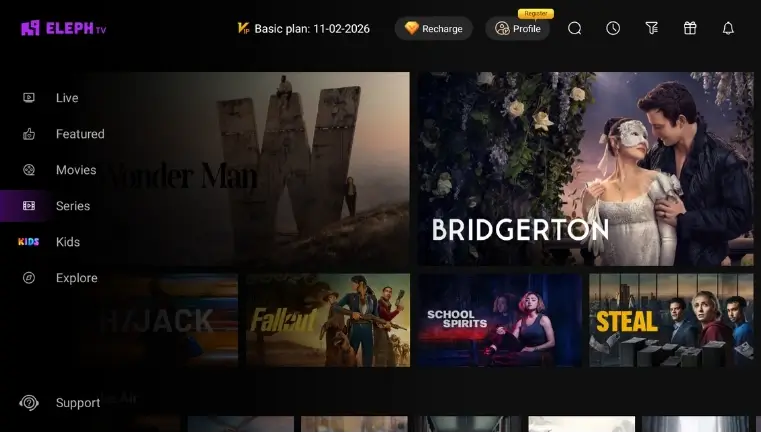
A package, version and hash help compare installers. They answer “which file is this?” rather than “is every stream authorized?”
Read terms, privacy and rights statements. A general disclaimer may not list a license for each channel or event.
Rights can vary by territory, device and subscription tier. Check the country where you watch and pay.
If the operator, content source, renewal terms or complaint route are unclear, record that uncertainty instead of trusting a mirror-site label.
Use this order to decide whether an Eleph TV APK and its content claims deserve further trust. Stop when evidence becomes inconsistent; a checklist reduces uncertainty but cannot guarantee a result.
Record the page, domain, download button and date. Do not assume every mirror, mod page or store listing belongs to the same publisher.
Check Android app information, package name, version code and signing details where available. A different package may be a different app despite a familiar logo.
Ask whether permissions match a streaming app. Be cautious about unrelated access, accessibility control, device administration or payment credentials.
Look for named broadcasters, rights notices, territory terms, event restrictions and a real support route. A famous channel list is not proof of redistribution rights.
Separate a free download from free viewing and a trial from a paid plan. Confirm the merchant, renewal date, refund path and cancellation method first.
Use the law and contract terms that apply where you live and watch. Prefer a clearer answer from the rights holder or a qualified local adviser; if rights remain unclear, choose an authorized alternative.
Live sports make the legality question more urgent because rights are often sold for a country, season, competition and platform. A working player still may not show who licensed the feed. Playback quality, a channel logo and a large catalog are not substitutes for a rights notice.
When comparing Eleph TV with a broadcaster, pay-TV provider or official league service, look for the operator, territory, complaint route, merchant identity and a rights holder’s distribution information. “Not enough public information” is more useful than an invented yes or no.
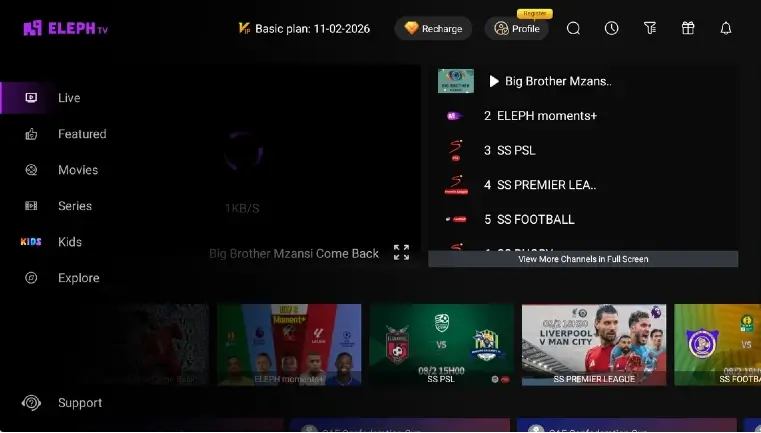
Ask whether the competition and event are licensed for your country and subscription tier, not only whether the player loads.
Check where the service is intended to operate and whether travel, VPN use or cross-border access changes the contract.
Look for a broadcaster, studio, league or distributor that recognizes the service. A copied channel list is not an ownership record.
A credible service should make it possible to ask about takedowns, copyright complaints, billing and account access without relying on a random mirror.
These signs do not prove illegality alone, but they weaken the evidence and raise practical risk. Several together are a reason to pause.
Modified APKs change code and make the publisher, permissions, updates and account behavior harder to verify.
Changing domains or hidden final sources make the distributor difficult to check.
Do not pay when merchant, renewal, refund or invoice identity is missing or inconsistent.
Every premium channel or live sport event is a marketing claim until a rights source explains it.
Password, accessibility-control or remote-access requests are separate security warnings.
For “can I install this APK?”, use the technical checks and device guides. For “may I watch this channel or match?”, you need rights and regional evidence. For “should I pay?”, confirm the merchant, renewal and cancellation terms first.
When the source is unclear and content rights are undocumented, pause. An official broadcaster, licensed app or documented provider may be less convenient, but it gives you a traceable support and rights route.
| Your question | Minimum evidence | Safer next step |
|---|---|---|
| Can it install? | Source, package, version and permissions | Use a spare device and verify the file |
| Can it legally show this? | Rights holder, territory and content terms | Ask the provider or use an authorized service |
| Should I pay? | Merchant, price, renewal and refund route | Do not pay until the contract is clear |
| Is a mod APK better? | Independent proof of code and publisher | Avoid modified or cracked builds |
A cautious “not verified” result is not a claim of wrongdoing. It simply means the public evidence is not strong enough to make a legal or safety conclusion.